Blast Search Tutorial
In this tutorial, we are going to perform a blast search against a simple local Blast database. BLAST is a tool bioinformaticians use to compare a sample genetic sequence to a database of known seqeuences; it’s one of the most widely used bioinformatics tools. We will follow an existing blast tutorial but we will convert the whole practice into bioflow pipeline.
You can find the original tutorial website by clicking here. Please open it in another browser tab.
Bioflows Command Line
Open a new terminal window and execute bf executable.
$ bf
    BioFlows is a distributed pipeline framework for expressing ,
designing and running scalable reproducible and distributed computational bioinformatics workflows in cloud containers.
BioFlows Framework consists of software tools and cloud microservices that communicate together to achieve a highly distributed ,
highly coordinated and fault tolerant environment to run parallel bioinformatics pipelines onto cloud containers
and cloud servers. BioFlows also has BioFlows Description Language (BDL) which is an imperative and declarative standard for
describing and expressing computational bioinformatics tools and pipelines, BDL is flexible , easy to use
and a human readable language that enables researchers to design reproducible and scalable computational pipelines.
The language is based entirely on Yet Another Markup Language (YAML).

        Usage:
          bf [command]

        Available Commands:
          Dag         This command enables creation of GraphViz graph for BioFlows Pipeline
          Hub         Helper actions to interact with BioFlows centralized hub which contains published tools and pipelines
          Node        A group of helper commands which enables joining remote cluster or starts a local cluster of Bioflows workers
          Show        This command enables manipulation of tools and BioFlows Pipeline(s)
          Tool        Helper commands to manage and run single BioFlows Tools
          Workflow    A group of helper commands that allow manipulating, managing , running and submitting BioFlows Pipeline(s)
          help        Help about any command
          validate    validates a given BioFlows tool or pipeline definition file. It checks whether the file is valid and well-formatted or not.
                The file path could be a Local File System Path or a remote URL.


        Flags:
              --config string          config file (default is $HOME/.bf.yaml)
              --data_dir string        The directory which contains raw data.
          -h, --help                   help for bf
              --output_dir string      Output Directory where the running tool will save data.
              --params_config string   A file which contains your Pipeline specific initial parameters' values. You can know the required parameters for your pipeline through reading its definition file or running bf validate command.
          -t, --toggle                 Help message for toggle
          -v, --version                version for bf

        Use "bf [command] --help" for more information about a command.
Creating the pipeline
id: blast_prions
type: pipeline
name: Blast_Prion
description:
  -"We’ll be running a BLAST (Basic Local Alignment Search Tool) example with a container from BioContainers. BLAST is a tool bioinformaticians use to compare a sample genetic sequence to a database of known seqeuences; it’s one of the most widely used bioinformatics tools."
website: https://pawseysc.github.io/container-workflows/08-bio-example/index.html
version: 0.0.1
steps:
As you can see, this is a pipeline tool with type: pipeline with a name, description, version and a reference to the original practice URL. The original author of the tutorial has downloaded a query fasta sequence and a genome sequence. He then used the genome sequence to create a local blast database index to use for fast local search using blastp tool, because the query sequence is a protein not a DNA, this is why we are going to use blastp.
There are many ways of how you design this pipeline yourself. you can simply download the original data first and put them in a folder and then add only makeblastdb and blast search steps in a pipeline or you can create two steps to download the data first and then followed by makeblastdb and blast search steps.
Please read the original practice first to understand what the author is doing and then read the following YAML file which includes all the steps.
id: blast_prions
type: pipeline
name: Blast_Prion
description:
  -"We’ll be running a BLAST (Basic Local Alignment Search Tool) example with a container from BioContainers. BLAST is a tool bioinformaticians use to compare a sample genetic sequence to a database of known seqeuences; it’s one of the most widely used bioinformatics tools."
website: https://pawseysc.github.io/container-workflows/08-bio-example/index.html
version: 0.0.1
steps:
  - id: DownloadFasta
    name: DownloadFasta
    inputs:
      - type: string
        displayname: URL for fasta file
        name: fasta_url
        value: http://www.uniprot.org/uniprot/P04156.fasta
    outputs:
      - type: file
        name: fasta_file
        value: "{{self_dir}}/P04156.fasta"
    command: "curl -OL {{fasta_url}} > {{fasta_file}}"
  - id: DownloadGenome
    name: DownloadGenome
    inputs:
      - type: string
        name: gfasta_url
        value : "ftp://ftp.ncbi.nih.gov/refseq/D_rerio/mRNA_Prot/zebrafish.1.protein.faa.gz"
    outputs:
      - type: file
        name: hs_gfasta
        value: "{{self_dir}}/zebrafish.1.protein.faa.gz"
    command: "curl -O {{gfasta_url}}"
  - id: UnzipGenome
    name: UnzipGenome
    depends: DownloadGenome
    command: "gunzip {{DownloadGenome.hs_gfasta}}"
    outputs:
      - type: file
        name: hs_fasta
        value: "{{DownloadGenome.location}}/zebrafish.1.protein.faa"

  - id: MakeBlastdb
    name: MakeBlastdb
    depends: DownloadFasta,UnzipGenome
    imageId: biocontainers/blast:v2.2.31_cv2
    command: "makeblastdb -in {{UnzipGenome.hs_fasta}} -dbtype prot"
  - id: FastaAlignment
    name: FastaAlignment
    depends: MakeBlastdb
    imageId: biocontainers/blast:v2.2.31_cv2
    outputs:
      - type: file
        name: results_file
        value: "{{self_dir}}/results.txt"
    command: "blastp -query {{DownloadFasta.fasta_file}} -db {{UnzipGenome.hs_fasta}} -out {{results_file}}"
Of course, if you understood the original practice well, these steps are self-explanatory. Please read carefully how the parameters are linked together.
Save that into a file, for instance, prions.yaml..
Drawing Pipeline Diagram
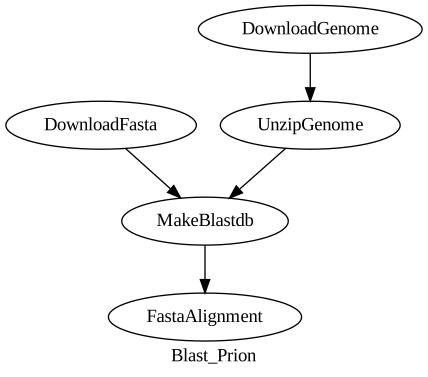
Now we have a reusable real bioinformatics pipeline that does something useful in practice and it is decoupled from any host file system. Now, assume that you are writing up your publication paper and need to have a visual diagram of this pipeline to include in your publication. All you need to do is to run the following bf command to have a publishable grade diagram.
First, you need to install graphviz software by running the following command.
$ sudo apt-get install graphviz
Second, you run bf Dag command like so..
$ bf Dag /your/script/location/prions.yaml | dot -Tsvg > prions.svg
If you opened the current working directory of where you run this command, you will find a file named prions.svg into the current working directory. double-click on this file to view it.
It will look something like..
Running your Pipeline
You can now easily run your pipeline giving only the output directory where the engine will save the folders of each step including all the results files.
$ bf Workflow run --output_dir=/your/output/directory --data_dir=/any/other/data/directory /your/script/location/prions.yaml